
The Conversion functions convert numbers and strings to different formats.
This function accepts a string format and arguments as inputs and returns a formatted string value based on these inputs.
Syntax:
| process eval("identifier=printf(format, arguments)")
format: The format is a character string that comprises one or more format conversion specifiers. The format must always be within single quotes (‘ ‘).
arguments: The arguments can include one or more string, number, or field name.
Example:
| process eval("result=printf('Hello %s. Your user score is %d.',user,score)")
| fields user, score, result
The above example assigns the value of the user field to %s and score field to %d and returns the defined sequence of strings in the result identifier.
The fields command displays the value of the user, score, and result in a tabular form.
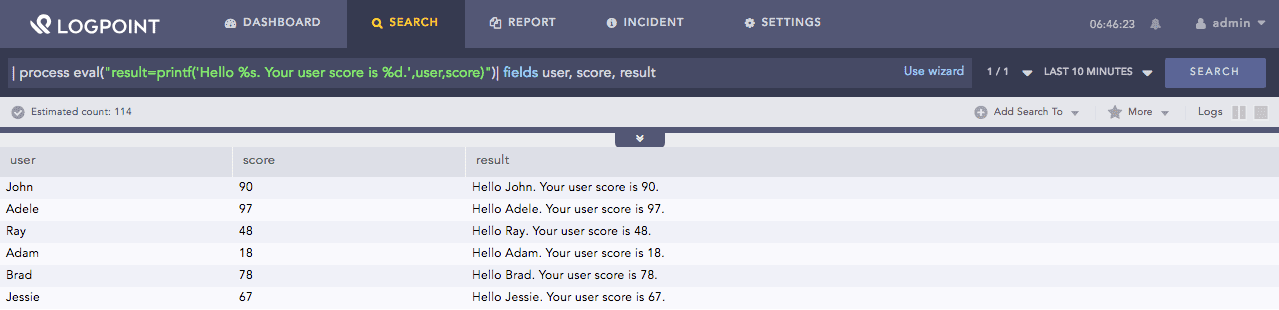
Printf function
This function accepts a string value X, and a BASE as inputs. It converts the string X to a number by the specified BASE.
Syntax:
| process eval("identifier=tonumber(X, BASE)")
X can be a field name or a string value.
The BASE defines the base number to convert the string value X. BASE can range from 2 to 36.
Example:
| process eval("result=tonumber('0A5',12)")
The above example converts the string value 0A5 to a number by taking base 12 and returns it in the result identifier.
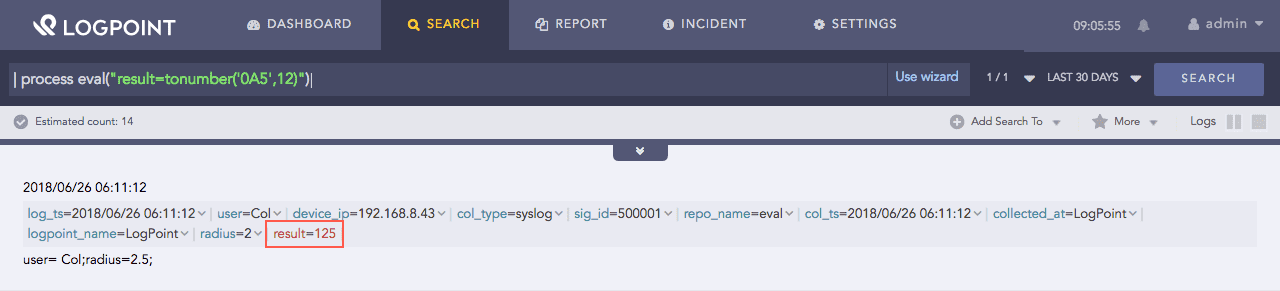
Tonumber function
This function accepts at least one argument X as input and converts the input value X to a string. If X is a number, the second field Y can be “hex,” “commas,” or “duration.” Y is optional.
Syntax:
| process eval("identifier=tostring(X, Y)")
If X is a number, the function converts the number to a string,
If X is a Boolean value, it returns the corresponding string value, True or False.
Syntax |
Description |
|---|---|
tostring(X, “hex”) |
Converts the input value X to hexadecimal. |
tostring(X, “commas”) |
Formats the input value X with commas. If the number includes decimals, it is rounded to the nearest two decimal places. |
tostring(X, “duration”) |
Converts the input value X (in seconds) to the readable time format HH:MM:SS. |
Example 1:
| process eval("x=tostring(12)")
The above example converts the numeric value of 12 to string.
Example 2:
| process eval("result=tostring(score,'hex')")
The above example converts the numeric value of the score field to its corresponding hexadecimal string value and assigns it in the result identifier.

Tostring function
Example 3:
| process eval("x=tostring(65,'duration')")
The above example converts the numeric value 65 into the readable time format HH:MM: and returns it in the x identifier. The result is 00:01:05.000.
Example 4:
| process eval("x=tostring(65132.6789,'commas')")
The above example formats the numeric value 65132.6789 with a comma and rounds the decimal value to the two decimal place (hundredths position) and returns it in the x identifier. The result is 65,132.68.